Fixing Overscan Issues for the Mac Mini Mediacenter
I have been running a Mac Mini (Core Duo 1.66) as a media center since I got it at RailsConf last June. Following advice from a friend I invested in a DVI to HDMI cable to hook it up to our Sony LCD TV. This actually improved the image quality noticeably.
However, like everyone else using the same setup I was annoyed with the overscan issue. Overscan makes the OS X menu bar fall outside of the visible area of the screen. Unfortunately, there is no easy way to fix this in OS X.
Fortunately, with the help from DisplayConfigX it is possible to add a custom resolution that will allow you to have the picture fill the entire screen. It isn’t obvious how to do this, but after some digging around using the HTPC search engine I found bits and pieces of information to help me configure it properly.
So, here are my settings with the hope that it can help others that have hooked up their Mac Mini with a Sony KDL-S32A11E widescreen LCD television.
Correcting Overscan with DisplayConfigX
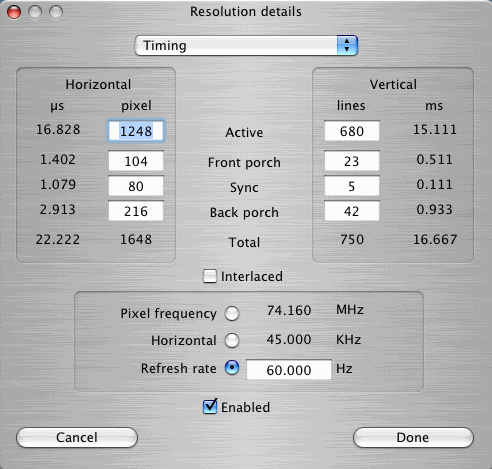
The key is to configure a custom resolution where the front and back porch values are modified to make sure the entire image fits inside the visible area of the screen. However, the total value for lines and pixels can not change. If the total value change the TV will not display an image. This means that you will have to adjust the “Active” values to accomodate for any changes you did to the front and back porch values.
Here are my settings:
To clarify the meaning of the front and back porch check this image:


At last! Thank you thank you thank you! I thought I would never find a way to see all of Front Row when playing music.
Thank you very much. It works!
Thanks! I have been looking for tis for a long time. Strange that Apple doesn’t include a settings panel for this in OS X.
Thank you very much for all the info….very helpful. I have a Sony LCD projection TV KF42we610 that I am trying to figure out the timing settings, but no luck so far. I am pretty close with about a 3/4″ black on the right, and 1″ missing on the left. The vertical is perfect. Do you have any suggestions for getting it right?
Does this mean that your overscan now is off?
[...] friend Jason sent along this link that described how another guy got his Sony HDTV display to overscan properly with DisplayConfigX. [...]
Thanks very much works perfectly, Vertical front and back porch were perfect had to change horizontal front porch to 184 and the back porch to 168.
thanks again
jim
http://support.apple.com/kb/HT2998
This support article fixed my issue.
Open System Preferences on the Mac.
Select the Displays pane.
Click the Options tab.
Deselect the Overscan checkbox.
Great,
finally, after years of trying, it works. Thanx for helping.
FIX: Panasonic PX50 X10 Y
…Hi
I’ve had a lot of problems fixing this overscan issue.
Turn out that after spending hours with DisplayConfigX, I found a setting in my Panasonic PX50 X10 Y to disable overscan.
Now it works like a charm in both 720p & 1080.
Might be worthwhile checking this out…
Hi If you have a Sony tv., Like mine 40W4500 star up your mac mini, and in the TV menu under settings find screen settings, there you will find display size, set this to full pixel.
and on your mac leave overscan on.
this fixed it for me atleast., without the use of any external programs.,.
Hi Moten what is the effect changing the display to full pixel on the television reception, and other (non-computer) inputs?
Thanks Moten, worked perfect!
Moten – thank you for the Sony tip, worked a treat!
Moten – You rock! My new Sony 46 inch LCD is now perfect. I will tell anyone reading this, that this is a Sony only setting. The mini I have on my Sharp is still jacked up. Off to play w/Display ConfigX for that one.