Building your own Twitter client with Fluid and jQuery
Update: I have made some significant changes to Twoot and it now works well as my primary twitter client. Check out the TODO and README over at Github for more information on features etc.
Like many before me, I was searching (unsuccessfully) for a decent twitter client. There are many, but most seem to be ad sponsored or based on a rather hefty framework like AIR (which by now, I guess, has been silently installed on my computer anyhow).
Custom apps have major implications for usability so I decided to roll my own. I wanted to try out Fluid, the Prism-like app to contain web apps in their own process/window, to see if it is possible to build a complete open source ad-free twitter client in a single web page only using javascript and HTML.
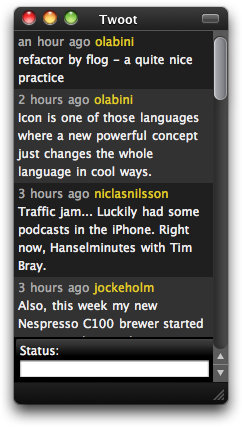
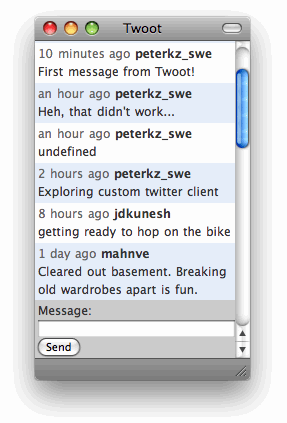
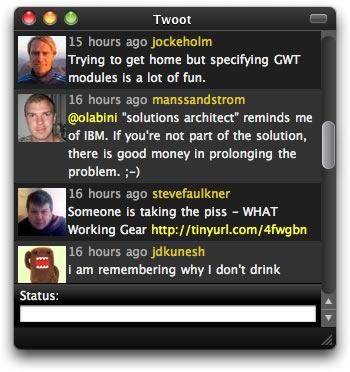
So, I cuiled for a jQuery twitter plugin but had to google it to find it. Some minor modifications to the code by the fine folks at SeaOfClouds and adding a method to post new status messages gave this native-looking OS X twitter client (HUD-style to the left, default style to the right and HUD avatars style below):
![]()
Thank’s to the twitter json api it was trivial to query my own friend feed and display it in Safari. Then, I used Fluid to create a self contained OSX app that displays my static HTML page. Googling a nice application icon makes it much better-looking in the taskbar. I decided to call it “Twoot”. Twoot consumes little memory and plays nice with embedded URLs (they open in a new Firefox tab).
Unfortunately, Fluid does not allow you to distribute the created app so you will have to roll your own by:
- Download and install Fluid.
- Create a folder called “twoot” in your home directory.
- Download the twoot html, js and css files from github and place in the twoot folder.
Edit twoot.js and set your twitter username and password.(Enter credentials in the basic auth form when launching app the first time).- Open Fluid and create a new app by pointing to the twoot.htm file (e.g. file:///users/you/twoot/twoot.htm) and set a nice icon.
- Save the app as “Twoot”.
- Your new twitter client is ready! Run it and resize as required, set the window to floating, kill tabs etc. Change the twoot.css and html file to customize it further.
Simple API:s are wonderful for usability!


Cool! I’ll try it out. I sympathize with your motives. Only sloth can explain why we nerds would accept to be drowned in ads by free applications.
Great idea.
I wish you could just distribute it as a standalone app tho.
The HUV view (black) is gorgeous.
Cheers
is their away to get a “posted via twoot” on our post?
I don’t see where to edit the username and password.
@nicholi: Sorry, scrapped that part. Since it is based on webkit you will get a standard basic auth login prompt the first time you refresh the window. If you tick the checkbox “remember…” you won’t have to enter your credentials again.
Hi there,
I tried to follow your instructions but it just doesn’t seem to work for me - all I get is either a “host not found” error page or just a blank page with a text input field labelled “Status”. How could I fix this?
@rampancy: Strange. I just repeated the steps above with the latest version of Fluid. Did you download all the files from github? Please note that you have to enter “file://” before the path when you point out the directory in Fluid.
What happens if you open the twoot.htm file in Safari? Please note that you can’t open it in Firefox (you will get an “Access to restricted URI denied” error).
@Taiwan Brown: Done!
[...] building your own koornk client with Fluid and jQuery flukoo is a customizable minimal koornk client for WebKit-based SSBs. It is based on jQuery, Fluid and some basic HTML and CSS. The idea is to provide a native-looking application that is easy to customize to your specific needs. flukoo javascript code is inspired and originally developed by Peter Krantz (twoot). [...]
Peter, I’ve got a git patch for you to get growl notifications in. Can I mail it to you somewhere?
Thanks
Sweetness. Only thing I am trying to find is the avatar setting. How or where please?
Tyrale, you have to select a theme with avatars. One is included in the hud-black-avatars folder. To switch theme, edit twoot.htm and point the stylesheet to the correct css file in the styles folder. The link element should point to “styles/hud-black-avatars/style.css”.
Thanks. Just got in to fluid 2 days ago. Love the help.
Peter,
I was hoping Twoot would work with either Safari or Chrome on Windows, but that doesn’t appear to be the case. I even tried to backtrack to the original version with the username and password in the javascript, but again no luck. Would you be able to point out which parts of the code are OSX dependent?
I’m sorry, but I can’t get it to work. It just keeps saying “getting new tweets”. I was really excited about this too! I hope you can tell me what I need to do.
I’m running Mac OS X 10.5, Fluid 0.9.5, and put it in my MAMP server.
Nice work man. Fluid ain’t open source though.
Nice work. Is there a way to get a “from application name” on my posts?
@Sarah It actually says “from Twoot” when you use it.
[...] Twoot - An ad-free open source minimalistic customizable twitter client for those who know HTML and CSS. Appified with Fluid. [...]
Ooh thanks Peter
Any way to resize the app window to be thinner just like your top two screenshots?
Is there support for viewing replies or direct messages from a separate screen?
Very sweet, just discovered Twoot. Only problem I have is it does not refresh and show new tweets from friends. I can manually refresh with Command+R but Twoot won’t do it otherwise. Even so, I like it better than anything else I’ve tried, thanks for sharing.
[...] Building Your Own Twitter Client with Fluid and jQuery Here, you will learn how to build your own Twitter client using Fluid (which contains Web apps in their own process/window), to see if it is possible to build a completely open-source, ad-free Twitter-like client on a single Web page, using only JavaScript and HTML. [...]
[...] Building Your Own Twitter Client with Fluid and jQuery Here, you module wager how to physique your possess Twitter computer using Fluid (which contains Web apps in their possess process/window), to wager if it is doable to physique a completely open-source, ad-free Twitter-like computer on a azygos Web page, using exclusive JavaScript and HTML. [...]
[...] Building Your Own Twitter Client with Fluid and jQuery Here, you will learn how to build your own Twitter client using Fluid (which contains Web apps in their own process/window), to see if it is possible to build a completely open-source, ad-free Twitter-like client on a single Web page, using only JavaScript and HTML. [...]
Thank you so much. I may actually be able to use twitter now. (tip: turn it into a MenuExtra). Cheers!
[...] Building Your Own Twitter Client with Fluid and jQuery Here, you will learn how to build your own Twitter client using Fluid (which contains Web apps in their own process/window), to see if it is possible to build a completely open-source, ad-free Twitter-like client on a single Web page, using only JavaScript and HTML. [...]
I’ve got a friend who wants to track and post from multiple twitter accounts from a single account. Where is the authentication kept for the app? Where would one start to add multiple accounts, in the same way that monitter.com does multiple searches?
@Norm Since Twoot uses a webkit instance the authentication details are kept in the OSX keychain. Currently, there is no code to handle authentication and I am not sure how it could be done. Please do investigate and get in touch if you are able to make it work.
I converted it to a a menubar extra….works sweet that way!!!!
Wow! I love it! I’ve tried several different Twitter Apps and really didn’t like them all that much, something was always too quirky about it, and the ads were annoying. I’ve never used Fluid before but will definitely be doing so for different sites and app ideas. THANKS!
[...] Studio. OS X Desktop app by BlueCrestStudios Twittia Twitter-client for OS X by Jeena Paradies Twoot - An ad-free open source minimalistic customizable twitter client for those who know HTML and CSS. [...]
Maybe I’m an idiot, but can you elaborate on how to download from github? The download link doesn’t seem to work (the zip option gives an error, the tar gives something that’s not a tar file (when ungzipped). Right-clicking on the individual files doesn’t give what I want. I got twoot.htm by cutting and pasting into BBEdit. Surely I’m doing something wrong?!?
Of course, trying it again after posting, the download link zip option DID work. Doh!
[...] Twoot - An ad-free open source minimalistic customizable twitter client for those who know HTML and CSS. [...]
[...] Building Your Own Twitter Client with Fluid and jQuery Here, you module wager how to physique your possess Twitter computer using Fluid (which contains Web apps in their possess process/window), to wager if it is doable to physique a completely open-source, ad-free Twitter-like computer on a azygos Web page, using exclusive JavaScript and HTML. [...]
[...] Building Your Own Twitter Client with Fluid and jQuery Here, you will learn how to build your own Twitter client using Fluid (which contains Web apps in their own process/window), to see if it is possible to build a completely open-source, ad-free Twitter-like client on a single Web page, using only JavaScript and HTML. [...]